How do you use this Arabic keyboard online?
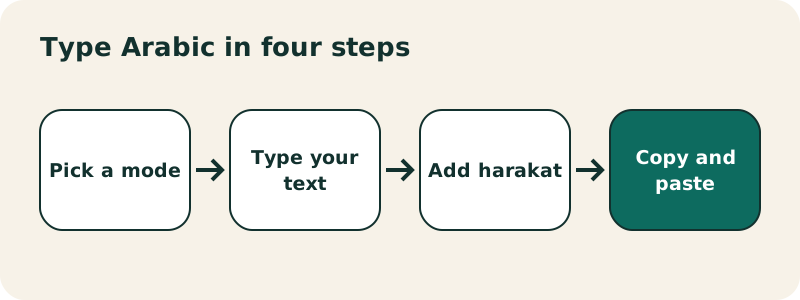
This Arabic keyboard works like a notepad with Arabic keys. The text box at the top writes from right to left, the way Arabic is read. Under it, the virtual keyboard follows the standard Arabic (101) layout used on Windows computers, so every letter sits exactly where it would on a real Arabic keyboard. You can click or tap the keys, type on your own keyboard, or mix both.
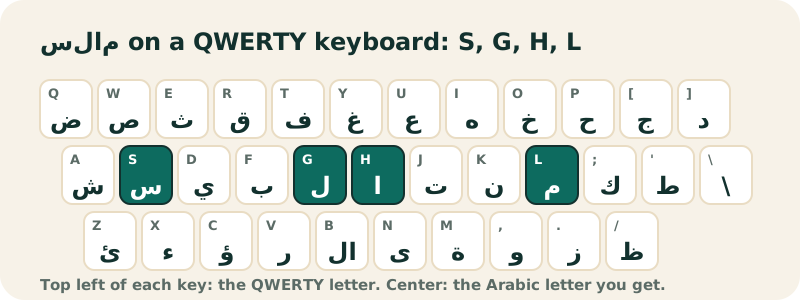
Because most readers in the US, the UK and Canada use a QWERTY keyboard, this page opens in QWERTY mode: each key shows the English letter printed at that position, small, in the corner. Want to type سلام (salam, "peace")? Press S, G, H, L. You do not have to learn the layout first; you can read it off the screen while you type.
When you are done, press Copy. The text is ordinary Unicode, so it pastes cleanly into a document, an email, a search box or a chat. If you close the tab by mistake, the draft is still there when you come back, because it is saved in your browser's local storage (and only there).
What are the three modes of the keyboard?
The three buttons above the text box switch the way the Arabic keyboard reads your keys. You can change mode at any time; the text you already typed stays in place, so one Arabic keyboard covers three ways of typing.
| Mode | What you see on the keys | Best for |
|---|---|---|
| Standard Arabic | Arabic letters only | People who already know the Arabic layout, or who want a clean on-screen keyboard |
| QWERTY (default here) | Arabic letter + the QWERTY key at that position | Learning where each letter is on a US or UK keyboard |
| Phonetic | Arabic letter + the Latin letter that types it | Typing Arabic with English letters: s, l, m, sh, kh, 3, 7 |
The phonetic mode has its own guide, English to Arabic keyboard, because it follows different rules. In short: each Latin letter becomes one Arabic letter, in the order you type it. It transliterates; it does not translate.
On a phone, the on-screen keys are the easiest way to type. Tick "use only this keyboard" under the tool to hide your phone's own keyboard while you tap.
What do the buttons under the text box do?
| Button | What it does |
|---|---|
| Copy | Copies the whole text to your clipboard |
| Undo | Steps back through your last changes, including Clear |
| Clear | Empties the box (Undo brings the text back) |
| Remove harakat | Deletes every vowel mark and keeps the letters |
| Download (.txt) | Saves a UTF-8 text file that opens correctly in Notepad, TextEdit or Word |
| A− / A+ | Makes the Arabic text smaller or bigger; the size is remembered |
| Listen | Reads the text aloud, only if your device has an Arabic voice installed |
| Google, YouTube | Opens a search for your Arabic text in a new tab |
| Translate | Opens Google Translate from Arabic to English in a new tab |
| Opens WhatsApp with your text ready to send |
The search, translate and WhatsApp buttons only open a new tab when you click them. Until then, nothing you type goes anywhere: the page has no code that sends your text to a server.
How do you type Arabic with your own keyboard without changing Windows or Mac settings?
On a computer, the toggle Type Arabic with my keyboard is on by default. The keyboard reads the physical position of each key you press (not the letter printed on it) and types the Arabic letter that sits at that position on an Arabic keyboard. Your QWERTY key F gives ب, J gives ت, H gives ا. Your system language and layout do not change, and the effect stops as soon as you leave the text box.
This is the fastest way to type Arabic on a work computer, a library PC or any machine where you cannot install a language. If you already added the Arabic layout to Windows or macOS, turn the toggle off and let your system type: both give the same letters, because both follow the same layout.
- Home row: A S D F G H J K L ; ' give ش س ي ب ل ا ت ن م ك ط.
- Top row: Q W E R T Y U I O P [ ] give ض ص ث ق ف غ ع ه خ ح ج د.
- Bottom row: Z X C V B N M , . / give ئ ء ؤ ر لا ى ة و ز ظ.
- Backtick (`) gives ذ.
Where is each Arabic letter on a QWERTY keyboard?
The table below is printed from the same data file that draws the Arabic keyboard, so it always matches what the keys really type. The third column is what you get with Shift held down. Wikipedia's article on the Arabic keyboard covers the history of the layout, from the first Arabic typewriters to today's computer keyboards.
| QWERTY key | Arabic letter | With Shift |
|---|---|---|
` | ذ | ـّ |
Q | ض | ـَ |
W | ص | ـً |
E | ث | ـُ |
R | ق | ـٌ |
T | ف | لإ |
Y | غ | إ |
U | ع | ‘ |
I | ه | ÷ |
O | خ | × |
P | ح | ؛ |
[ | ج | < |
] | د | > |
A | ش | ـِ |
S | س | ـٍ |
D | ي | ] |
F | ب | [ |
G | ل | لأ |
H | ا | أ |
J | ت | ـ |
K | ن | ، |
L | م | / |
; | ك | : |
' | ط | " |
Z | ئ | ~ |
X | ء | ـْ |
C | ؤ | } |
V | ر | { |
B | لا | لآ |
N | ى | آ |
M | ة | ’ |
, | و | , |
. | ز | . |
/ | ظ | ؟ |
Why is the layout not alphabetical?
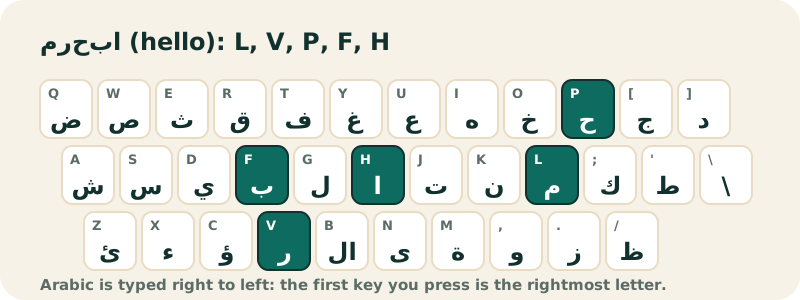
Like QWERTY, the Arabic layout grew out of typewriters, and frequent letters were placed under the strongest fingers. The home row holds alif, lam, ba, ta, nun, mim and ya, which appear in almost every Arabic sentence. The definite article ال is H then G, two keys side by side. Once your fingers know the home row, the rest comes quickly; the Arabic typing test has lessons row by row.
How do you type Arabic with English letters?
Switch to Phonetic and type the way you would text a friend in Arabizi: s gives س, sh gives ش, 3 gives ع, 7 gives ح. Capital letters give the "heavy" consonants: S = ص, D = ض, T = ط, Z = ظ, H = ح.
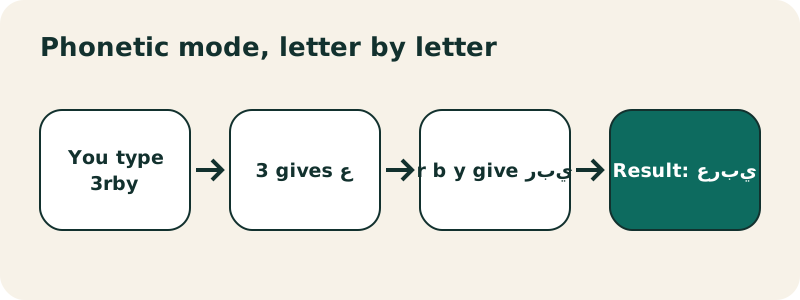
The conversion is letter by letter, and Arabic does not usually write short vowels. So salam gives سالام (with two extra alifs), while slam gives the correct سلام. Type the consonants and the long vowels; leave out the short ones. The number 9 gives ق, as in North African texting; in the Gulf and the Levant people often use 9 for ص instead, which you type here with a capital S.
| You type | You get | Meaning |
|---|---|---|
slam | سلام | peace, hello |
3rby | عربي | Arabic |
mr7ba | مرحبا | welcome, hi |
shkran | شكران | letter by letter; the usual spelling is شكرا, typed shkra |
Every rule, with a full table, is on the English to Arabic keyboard page.
How do you add harakat (short vowels)?
Harakat are the small marks above and below the letters that show short vowels and doubled consonants. Most everyday Arabic is written without them, but you need them for the Quran, poetry, children's books, language exercises and any word whose reading would otherwise be ambiguous. Wikipedia's Arabic diacritics article lists every mark.
Type the letter first, then the mark. You can click the Harakat row under the keyboard, or hold Shift on your physical keyboard:
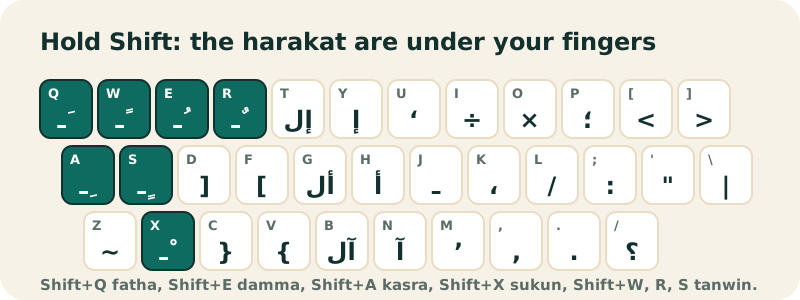
- Shift+Q = fatha ـَ (a), Shift+E = damma ـُ (u), Shift+A = kasra ـِ (i)
- Shift+X = sukun ـْ (no vowel), Shift+` = shadda ـّ (doubled consonant)
- Shift+W, Shift+R, Shift+S = tanwin ـً ـٌ ـٍ (-an, -un, -in)
مَرْحَبًا بِكُمْ
The Arabic keyboard with harakat page puts the vowel row first and explains each sign, with examples. If you pasted a vowelled text and want it plain, Remove harakat strips every mark in one click.
How do you type hamza, lam-alif and ta marbuta?
These letters trip up almost every beginner, because they live in the bottom row and on the Shift layer:
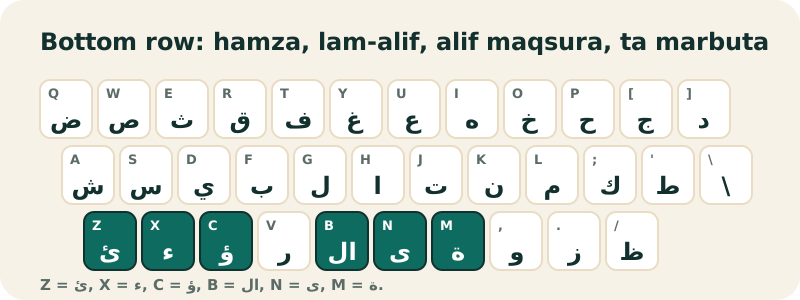
- ء hamza on its own: X. ئ on a ya seat: Z. ؤ on a waw seat: C.
- أ alif with hamza above: Shift+H. إ alif with hamza below: Shift+Y. آ alif madda: Shift+N.
- لا lam-alif: B (or G then H, which gives the same ligature).
- ة ta marbuta: M. ى alif maqsura: N. Both appear only at the end of a word.
The Hamza row under the keyboard also has every hamza form and alif wasla ٱ, so you can click them instead.
How do you write Arabic numerals ٠١٢٣?
The digits you use in English (0–9) are often called "Arabic numerals". Much of the Arab world, especially in the Middle East, also uses a second set, the Eastern Arabic digits. Turn on Digits above the text box and the number keys type them instead:
| Western digit | Eastern Arabic digit | Unicode |
|---|---|---|
| 0 | ٠ | U+0660 |
| 1 | ١ | U+0661 |
| 2 | ٢ | U+0662 |
| 3 | ٣ | U+0663 |
| 4 | ٤ | U+0664 |
| 5 | ٥ | U+0665 |
| 6 | ٦ | U+0666 |
| 7 | ٧ | U+0667 |
| 8 | ٨ | U+0668 |
| 9 | ٩ | U+0669 |
Unlike letters, numbers in Arabic text are written left to right, most significant digit first, exactly as in English: 2026 is ٢٠٢٦.
Which punctuation does Arabic use?
Arabic has its own comma ،, semicolon ؛ and question mark ؟, which face the other way. On the keyboard: Shift+K gives ،, Shift+P gives ؛, Shift+/ gives ؟. The period and the exclamation mark are the same as in English. The Punctuation row also offers the angle quotation marks « » and the tatweel ـ, a stretch line used in titles and calligraphy.
How do you install an Arabic keyboard on Windows, Mac, iPhone or Android?
An online Arabic keyboard is perfect for a quick message or on a computer you do not control. If you write Arabic every day, add the layout to your device too, so you can type straight into every app. Every system includes it for free; there is nothing to download from a third party.
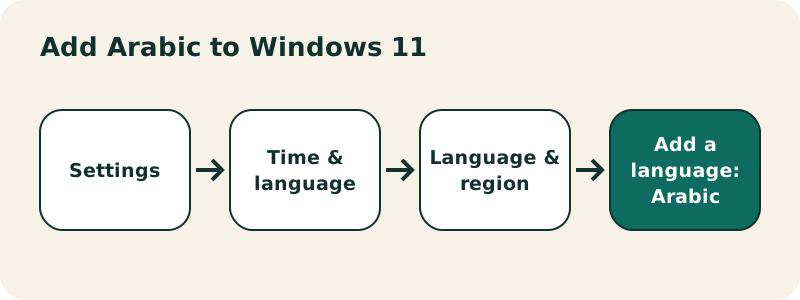
- Windows 11 and 10: Settings › Time & language › Language & region › Add a language. Switch layouts with the Windows logo key + Spacebar. Full guide: type Arabic on Windows.
- iPhone: Settings › General › Keyboard › Keyboards › Add New Keyboard › Arabic. See type Arabic on iPhone and Apple's keyboard guide.
- Android (Gboard): Gboard Settings › Languages › Add keyboard › Arabic. See type Arabic on Android and Gboard Help.
- Mac: System Settings › Keyboard › Text Input › Edit › + › Arabic, as described in Apple's guide.
Microsoft describes the Windows shortcut this way:
“A keyboard layout can also be selected by holding down the Windows logo key on the keyboard and then selecting the Spacebar.”
Online keyboard or installed keyboard: which should you use?
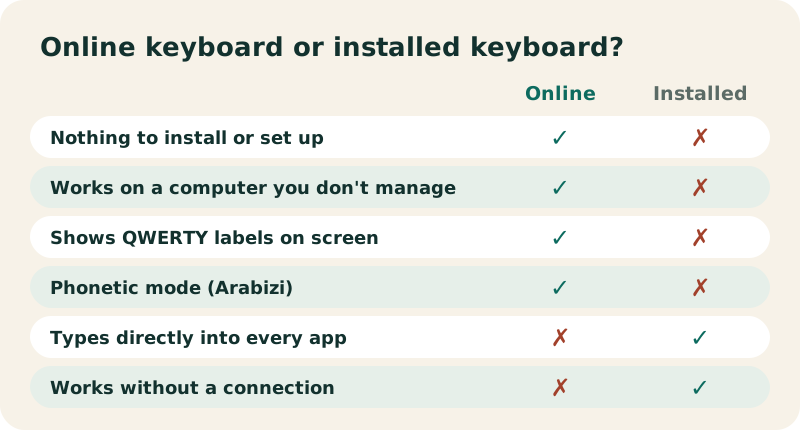
Use the online Arabic keyboard when you need Arabic now, when you want to see the letter on each key, when you prefer typing in Latin letters, or when you are on a shared machine. Install the system layout when Arabic becomes part of your daily work: it types directly into every program, works offline and supports your phone's predictive text. Many people use both: the system layout for speed, this page to check where a rare letter is or to add harakat. An installed Arabic keyboard and this online Arabic keyboard use the same letter positions, so nothing you learn here is wasted.
How does Arabic writing work?
Arabic has 28 letters, written from right to left, with no capital letters. Most letters join the next one inside a word, so each letter has up to four shapes: isolated, initial, medial and final. You never choose the shape yourself; you type the basic letter and the font joins it correctly. Wikipedia sums it up:
“It is a unicameral script written from right-to-left in a cursive style, and includes 28 letters, of which most have contextual forms.”
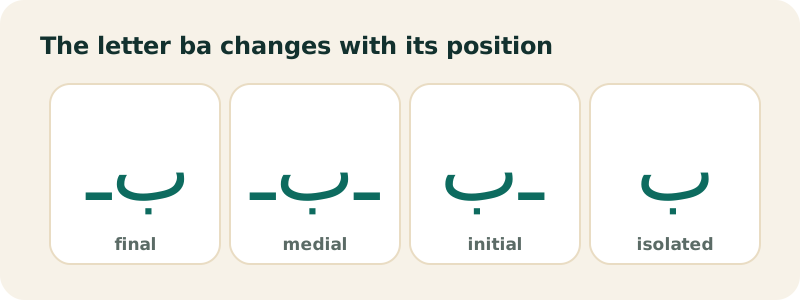
Six letters (ا د ذ ر ز و) never join the letter after them, which is why words sometimes look broken into pieces. Some letters change a lot from one position to another, like ayn:
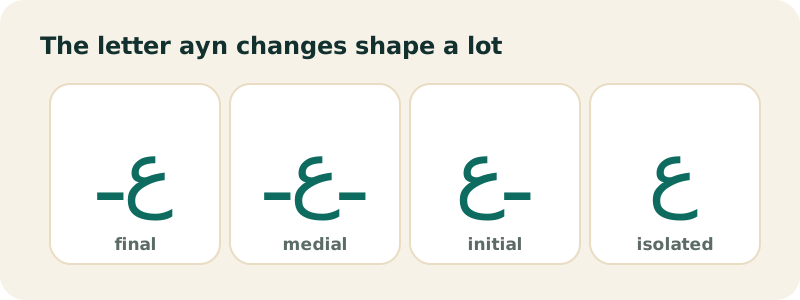
Our Arabic alphabet page shows every letter with its four forms, its sound and its QWERTY key.
What else does the keyboard offer beyond the 28 letters?
Arabic script is used for dialects and other languages, which need sounds that Standard Arabic lacks. The Dialect letters row has them:
- ڤ and ڥ for the sound v (the second one in North Africa)
- گ, ݣ (Morocco) and ڨ (Algeria, Tunisia) for a hard g
- پ for p and چ for ch (or g in parts of the Levant)
These are real Unicode characters, so they paste into any app. The phonetic mode types two of them directly: v gives ڤ and p gives پ.
How do you paste Arabic text into Word, Gmail or WhatsApp?
Copy here, paste there. Apps that support Arabic detect it and align the text to the right. A few tips if something looks off:
- Word: after pasting, use the Right-to-left paragraph button (Paragraph group, Home tab) so punctuation lands on the correct side. Microsoft notes that the button only appears once a right-to-left language is enabled.
- Gmail and Outlook: Arabic text pastes in right to left; if the line sits on the wrong side, use the alignment button in the formatting bar.
- WhatsApp, Instagram, Messenger: Arabic aligns itself; nothing to do.
- Mixed English and Arabic: type them in separate lines when possible; a single line mixing both directions can show the punctuation in surprising places.
Microsoft's help page on right-to-left languages in Office also explains how to switch the keyboard there: Using right-to-left languages in Office.
What should you do if Arabic text displays incorrectly?
- Letters appear separated or reversed: the app does not support Arabic shaping. Paste into a modern browser, Word, Google Docs or a phone app instead.
- Empty boxes (tofu): the font has no Arabic glyphs. Change the font, for example to Arial, Segoe UI or Noto Naskh Arabic.
- The period or question mark is on the wrong side: the paragraph is set left to right. Switch it to right to left.
- Harakat look misplaced: some fonts position them poorly. Try another font, or make the text bigger with A+.
The W3C explains why direction matters: each character has a direction, and "Letters from right-to-left scripts are strongly typed as RTL", while spaces and punctuation take the direction of their surroundings (Unicode Bidirectional Algorithm basics).
Is your text private?
Yes. This Arabic keyboard is a small script that runs in your browser. What you type stays on your device, and the site's security policy blocks the page from connecting to any other website. Your draft and text size are kept in your browser's local storage, which you can clear at any time. The site logs simple page visits (no cookies, no ads), as detailed in the privacy policy.
Choose your Arabic keyboard mode
Type Arabic on your own device
Learn and practice Arabic script
Frequently asked questions
Is this Arabic keyboard free?
Yes. It is free, with no sign-up and no download. It runs in any modern browser on Windows, Mac, Chromebook, Linux, iPhone, iPad and Android.
Do I need to install anything to type in Arabic?
No. The keyboard works in the page. On a computer, your physical keys type Arabic letters as long as the "Type Arabic with my keyboard" toggle is on, without changing your system settings.
Which layout does the keyboard use?
The standard Arabic (101) layout used by Windows. QWERTY mode only adds the English key label on each key; the Arabic letters are in the same places.
Can I type Arabic using English letters?
Yes, with the Phonetic mode: s gives س, sh gives ش, 3 gives ع, 7 gives ح. It converts letter by letter, so type slam rather than salam to get سلام.
Does the keyboard translate English into Arabic?
No. It only changes the script. To understand or translate your Arabic text, use the Translate button, which opens Google Translate in a new tab.
How do I type Arabic vowels?
Short vowels are harakat: click them in the Harakat row, or hold Shift: Shift+Q for fatha, Shift+E for damma, Shift+A for kasra, Shift+X for sukun.
Why does salam come out as سالام?
Because each Latin letter becomes one Arabic letter, and a becomes alif. Arabic leaves short vowels unwritten, so type slam to get سلام.
Does it work on my phone?
Yes. Tap the on-screen keys, and tick "use only this keyboard" to hide your phone's keyboard. For daily use, add the Arabic keyboard to your iPhone or Android settings too.
How do I type the Arabic question mark?
Press Shift and the / key, or click ؟ in the Punctuation row.
Can I save my Arabic text as a file?
Yes. Download (.txt) saves a UTF-8 text file that opens with the Arabic intact in Notepad, TextEdit or Word.
Why is the Listen button missing?
It only appears when your device or browser has an Arabic text-to-speech voice. Many phones and computers include one; some do not.
Is what I type sent to your servers?
No. Your text stays in your browser. It only leaves your device if you click Google, YouTube, Translate or WhatsApp, which open that service in a new tab.
Related pages
Every page in this section:
Sources
- Manage the language and keyboard/input layout settings in Windows — Microsoft
- Using right-to-left languages in Office — Microsoft
- Add or change keyboards on iPhone — Apple
- Write in another language on Mac — Apple
- Type in a different language (Gboard Help) — Google
- Arabic alphabet — Wikipedia
- Arabic keyboard — Wikipedia
- Unicode Bidirectional Algorithm basics — W3C