What are harakat?
Harakat (حَرَكَات, "movements") are the small marks written above or below Arabic letters to show short vowels, the absence of a vowel and doubled consonants. Together with a few other signs they make up the tashkeel (تَشْكِيل), the full vowelling of a text. Arabic letters mostly write consonants and long vowels; harakat fill in the rest.
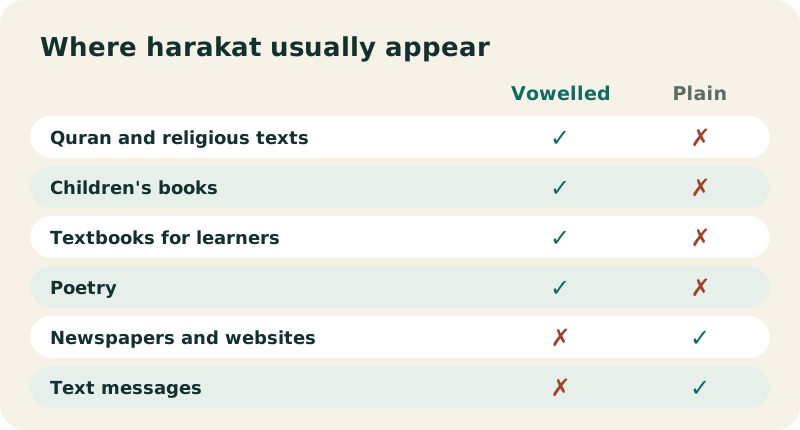
Most modern Arabic is printed without them. Native readers know the words and supply the vowels. Wikipedia sums up where they do appear:
“The bulk of Arabic script is written without ḥarakāt (or short vowels). However, they are commonly used in texts that demand strict adherence to exact pronunciation.”
That means the Quran and other religious texts, poetry, children's books, dictionaries, textbooks for learners, and any single word whose reading would be ambiguous. If you are learning Arabic, an Arabic keyboard with harakat is how you write exercises the way your book prints them.
Which signs are in the Harakat row?
This Arabic keyboard with harakat opens with the Harakat row right under the keys. The table is printed from the keyboard's own data, with each sign's Unicode code point:
| Sign | Name | Unicode |
|---|---|---|
| ـَ | fatha | U+064E |
| ـُ | damma | U+064F |
| ـِ | kasra | U+0650 |
| ـْ | sukun | U+0652 |
| ـّ | shadda | U+0651 |
| ـً | tanwin fath (-an) | U+064B |
| ـٌ | tanwin damm (-un) | U+064C |
| ـٍ | tanwin kasr (-in) | U+064D |
| ـٓ | madda | U+0653 |
| ـٰ | dagger alif | U+0670 |
| ء | hamza | U+0621 |
| ـأ | alif with hamza above | U+0623 |
| ـإ | alif with hamza below | U+0625 |
| ـآ | alif madda | U+0622 |
| ـؤ | waw with hamza | U+0624 |
| ـئ | ya with hamza | U+0626 |
| ـٱ | alif wasla | U+0671 |
The hamza forms in the second part of the table are full letters, not marks, but they sit in the same row because beginners often look for them there.
What do fatha, damma and kasra sound like?
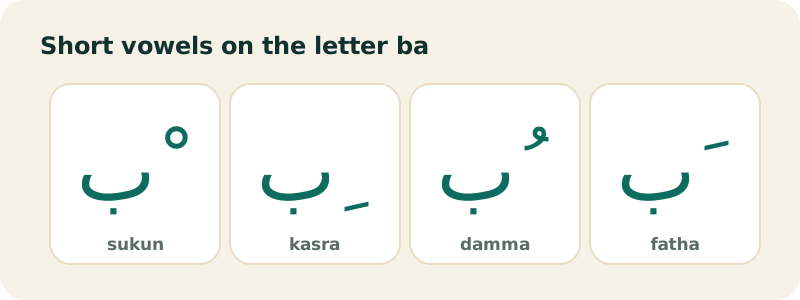
These are the three short vowels of Arabic.
Fatha: a short a
A small diagonal stroke above the letter: بَ = ba. Its sound ranges from the a in cat to the u in cut, depending on the consonant. Example: كَتَبَ (kataba, "he wrote"). Shift+Q.
Damma: a short u
A small waw-shaped curl above the letter: بُ = bu, as in put. Example: كُتُب (kutub, "books"). Shift+E.
Kasra: a short i
A diagonal stroke below the letter: بِ = bi, as in bit. Example: كِتَاب (kitāb, "book"). Shift+A.
كَتَبَ · كُتُب · كِتَاب
The three words above share the root k-t-b (writing). Only the harakat and one long vowel tell them apart, which is exactly why dictionaries and textbooks print them.
What does sukun do?
Sukun (سُكُون, "stillness") is a small circle above a letter. It says: this consonant has no vowel after it. In مَدْرَسَة (madrasa, "school"), the sukun on د shows that the d closes the first syllable: mad-ra-sa. Shift+X types it.
How does shadda work?
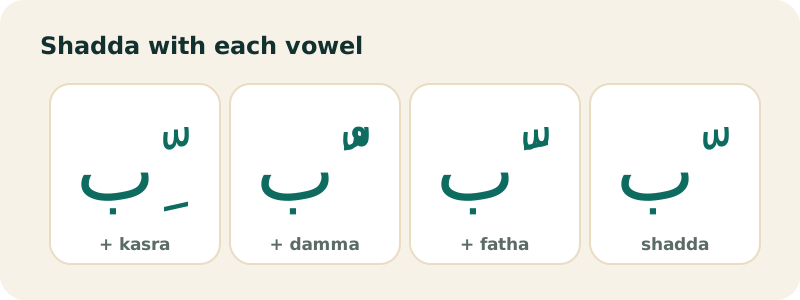
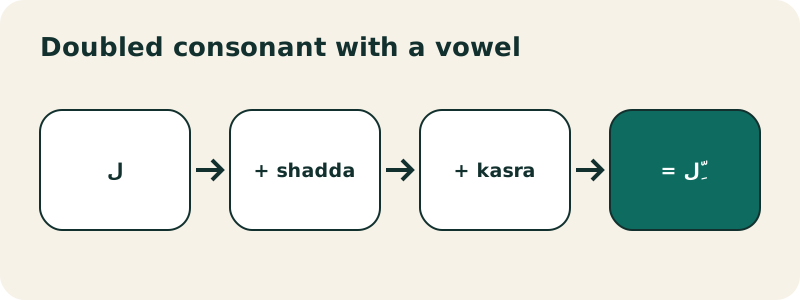
Shadda (شَدَّة) looks like a small w above the letter. It doubles the consonant: مُعَلِّم (mu'allim, "teacher") has a double l. It almost always comes with a vowel: the fatha and damma go on top of the shadda, and the kasra sits either under the letter or just under the shadda, depending on the font.
On a QWERTY keyboard, shadda is Shift + the backtick key (`), the key that types ذ without Shift. In the Harakat row, it is the fifth button.
What is tanwin?
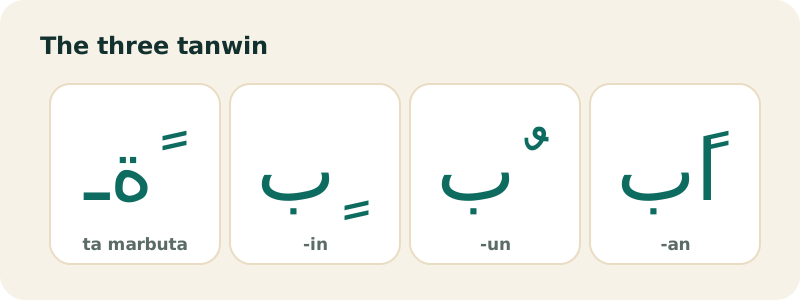
Tanwin (تَنْوِين, "nunation") is a doubled vowel mark at the end of a word. It adds an n sound and marks an indefinite noun in grammar: كِتَابٌ (kitābun, "a book").
| Sign | Name | Sound | Example | Key |
|---|---|---|---|---|
| ـً | tanwin fath | -an | كِتَابًا | Shift+W |
| ـٌ | tanwin damm | -un | كِتَابٌ | Shift+R |
| ـٍ | tanwin kasr | -in | كِتَابٍ | Shift+S |
With tanwin fath, most words also take an extra alif after the last letter. Type the mark on the letter, then the alif: ب + ـً + ا. That is how مَرْحَبًا and شُكْرًا are written.
What are madda, dagger alif and wasla?
- Madda ـٓ: a wavy line. On an alif, آ, it writes a hamza followed by a long a, as in آدَم (Adam). The ready-made آ is Shift+N; the separate mark is in the Harakat row.
- Dagger alif ـٰ: a small vertical stroke that writes a long a not spelled with a full alif, as in the Quranic spelling of ٱلرَّحْمَٰن.
- Alif wasla ٱ: an alif with a small sad-shaped sign, showing that its vowel is dropped when the word follows another. It is common in vowelled religious texts and sits in the Hamza row.
How do you type harakat with this keyboard?
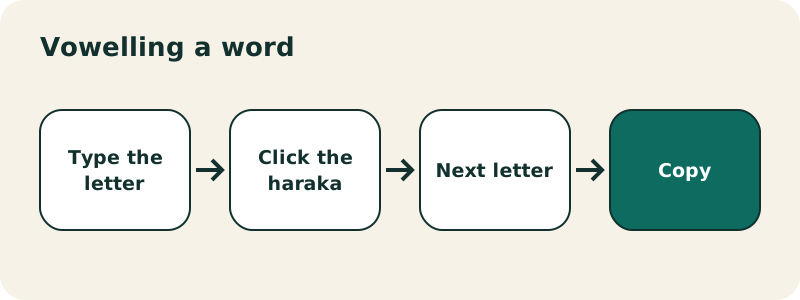
- Type the letter: click it, or press its key on your keyboard.
- Click the mark in the Harakat row. The mark attaches to the letter just before the cursor.
- Go on with the next letter. If you put a mark on the wrong letter, press backspace once: it removes only the mark.
You can also type the marks from your physical keyboard while "Type Arabic with my keyboard" is on. On the keyboard picture, hold Shift (or click ⇧) to see where each mark lives:
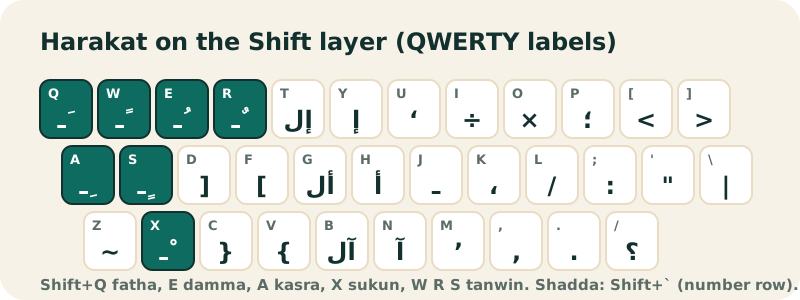
In phonetic mode, Latin vowels become long-vowel letters, so add short vowels by clicking the Harakat row.
In which order do you type letter, shadda and vowel?
Letter first, always: a haraka has nothing to sit on until its letter exists. For a doubled consonant, the usual order is letter, shadda, then the vowel: ل + ـّ + ـِ gives the لِّ of مُعَلِّم. Unicode normalization puts shadda after the vowel internally, and well-made fonts show both orders the same way, so do not worry if you typed them the other way round.
How do you remove all harakat from a text?
Paste the text in the box and press Remove harakat. Every vowel mark, shadda, sukun, tanwin, madda and dagger alif is deleted; the letters, including hamza forms like أ, stay. Undo brings the marks back if you change your mind.
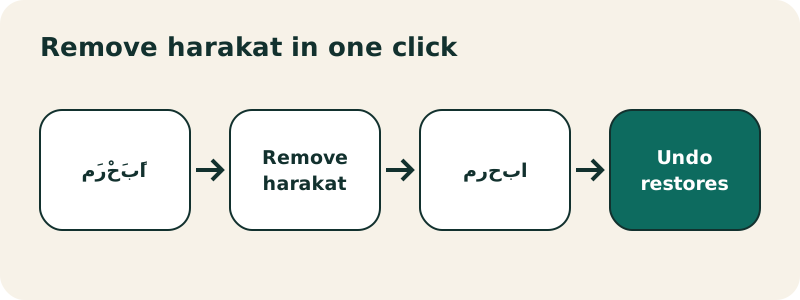
This is handy when a vowelled quote breaks a search (search engines and many apps treat كِتَاب and كتاب as different strings), or when you want a clean text for everyday use.
How do you type harakat on Windows?
Once the Arabic layout is added to Windows (see type Arabic on Windows), the harakat are on the Shift layer, exactly as on this page: Shift+Q fatha, Shift+E damma, Shift+A kasra, Shift+X sukun, Shift+` shadda, Shift+W/R/S tanwin. Switch to Arabic with the Windows logo key + Spacebar, type the letter, then the mark.
How do you type harakat on a Mac?
macOS offers several Arabic input sources, and their layouts are not identical to the Windows one. The surest method is Apple's Keyboard Viewer: choose Show Keyboard Viewer in the Input menu, then press Shift and the other modifier keys and watch where the marks appear. Apple documents the viewer in its guide to writing in another language on Mac. Or type in this Arabic keyboard with harakat, with the Windows positions, and paste.
How do you type harakat on iPhone and Android?
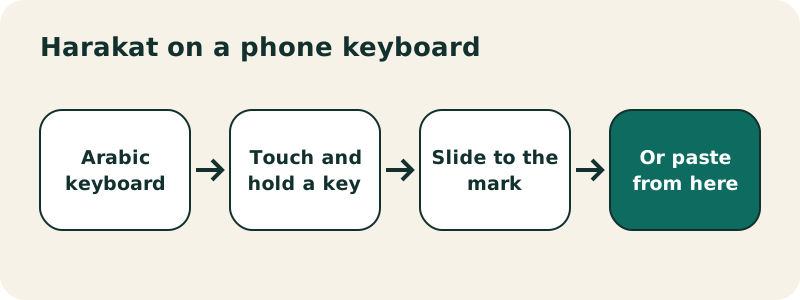
Phone keyboards hide the harakat on secondary keys or long presses, and the place changes with the keyboard app, the layout and the version. Apple and Google document how to add the Arabic keyboard, but we could not find an official page listing where each mark sits, so we will not invent one: open the Arabic keyboard, touch and hold the keys around alif and the punctuation keys, and look for the marks. If you only need a few vowelled words, it is often faster to tap them out on this page and paste. Setup guides: iPhone and Android.
Do harakat work in Word and Google Docs?
Yes. Harakat are ordinary Unicode characters, so a vowelled text copied from here keeps its marks in Word, Google Docs, Gmail or WhatsApp. If the marks collide with the letters, change the font: Arabic fonts designed for long texts, such as Noto Naskh Arabic, place them more cleanly. Microsoft notes that in Word you can select, find and replace individual diacritics, so you can also clean a document there.
Where are harakat used, and what should you practise on?
- Short greetings: مَرْحَبًا, شُكْرًا, مَعَ ٱلسَّلَامَة.
- Your textbook's vocabulary list: copying it with every mark trains your eye.
- The opening formula بِسْمِ ٱللَّهِ, which uses kasra, sukun, wasla, shadda and fatha in two words.
- Names you want printed or engraved: vowelling removes any doubt about the reading.
بِسْمِ ٱللَّهِ
Which mistakes should you avoid with harakat?
- Marks before letters. A mark typed first attaches to the previous letter, or floats on a dotted circle.
- Two vowels on one letter. A letter takes one short vowel. Only shadda combines with a vowel.
- Fatha instead of alif. A long a needs the letter ا; a fatha alone is short.
- Tanwin fath without its alif. Write كِتَابًا, not كِتَابً, except after ta marbuta (مَدْرَسَةً) and a few other endings.
- Sukun on a long vowel letter. Many textbooks leave alif, waw and ya of long vowels unmarked; follow your book's convention.
Should you learn to read with or without harakat?
Both, in that order. Learners start with vowelled texts so they can pronounce every word correctly, then move to unvowelled newspapers and websites, where context does the work. Typing vowelled Arabic is a good bridge: you have to decide every vowel, which fixes the patterns in memory. When you are ready, the Arabic alphabet page and the typing test help you speed up on the letters themselves.
Can you listen to a vowelled text?
If your device has an Arabic voice, a Listen button appears under the text box and reads your text aloud with your system's speech engine. Voices use the harakat when they are there, which helps you check a reading. If the button is missing, your device has no Arabic voice; nothing else is wrong. On Windows, Microsoft lists text-to-speech among the optional language features you can download for an installed language.
Frequently asked questions
How do I type harakat on a QWERTY keyboard?
Hold Shift: Q fatha, E damma, A kasra, X sukun, ` (backtick) shadda, W, R and S for the three tanwin. Or click them in the Harakat row.
What is the difference between harakat and tashkeel?
Harakat are the vowel marks (fatha, damma, kasra). Tashkeel is the full vowelling of a text and also includes sukun, shadda, tanwin and similar signs. People often use the two words loosely for the same thing.
Why does my haraka appear on a dotted circle?
It was typed with no letter before it. Delete it, type the letter, then the mark.
Can I add harakat in phonetic mode?
Yes. Type the letters in Latin, then click the marks in the Harakat row.
How do I remove harakat from Arabic text?
Paste the text and press Remove harakat. Undo restores them.
Which key is shadda?
Shift + the backtick key (`), top left on a US keyboard. It is also the fifth button of the Harakat row.
Do harakat survive copy and paste?
Yes. They are Unicode characters and paste with the letters into any app that supports Arabic.
Is tanwin a haraka?
Tanwin is written with doubled vowel marks, so it is usually listed with the harakat, but it also adds an n sound at the end of the word.
Why does the Quran use more signs than this keyboard?
Printed Qurans use extra recitation marks (small high letters, stop signs). The keyboard covers the vowelling used in textbooks and most vowelled texts, plus dagger alif, madda and wasla.
Is this Arabic keyboard with harakat free?
Yes: free, without sign-up, and it runs in your browser.
Related pages
Arabic keyboard — Free online Arabic keyboard: type Arabic with your QWERTY keyboard or by tapping the keys, then copy the text anywhere.
See also:
Sources
- Arabic diacritics — Wikipedia
- Arabic alphabet — Wikipedia
- Using right-to-left languages in Office — Microsoft
- Manage the language and keyboard/input layout settings in Windows — Microsoft
- Write in another language on Mac — Apple